Provisioning Mode
Provisioning Mode allows unprovisioned devices to connect to a Controller via a short-range WiFi SoftAP and receive their full configuration automatically. It is used for two purposes:
- Client Provisioning — an unprovisioned Client retrieves its WiFi credentials, MQTT settings, and CA certificate
- Controller Provisioning — an unconfigured Controller retrieves its full configuration bundle (all controller and client records) from a source Controller
Only one Controller should have Provisioning Mode active at any given time.
When enabled, the Controller broadcasts a WPA2-protected WiFi SSID of FireFly-Provisioning. The SoftAP accepts only one connected device at a time. Provisioning Mode is automatically disabled after 5 minutes in production builds and 30 minutes in debug builds (configurable at compile time via PROVISIONING_MODE_TTL).
Provisioning Mode is enabled via the Configurator UI or by calling PUT /api/provisioning. Enabling it may take several seconds while the Controller's on-board WiFi radio starts and the approved device list is prepared. Disabling it takes a second or two to disconnect devices and shut down the SoftAP.
Client Provisioning
An unprovisioned Client has no WiFi credentials, MQTT configuration, or CA certificate. It enters provisioning mode automatically on boot when no valid configuration is found.
Protocol
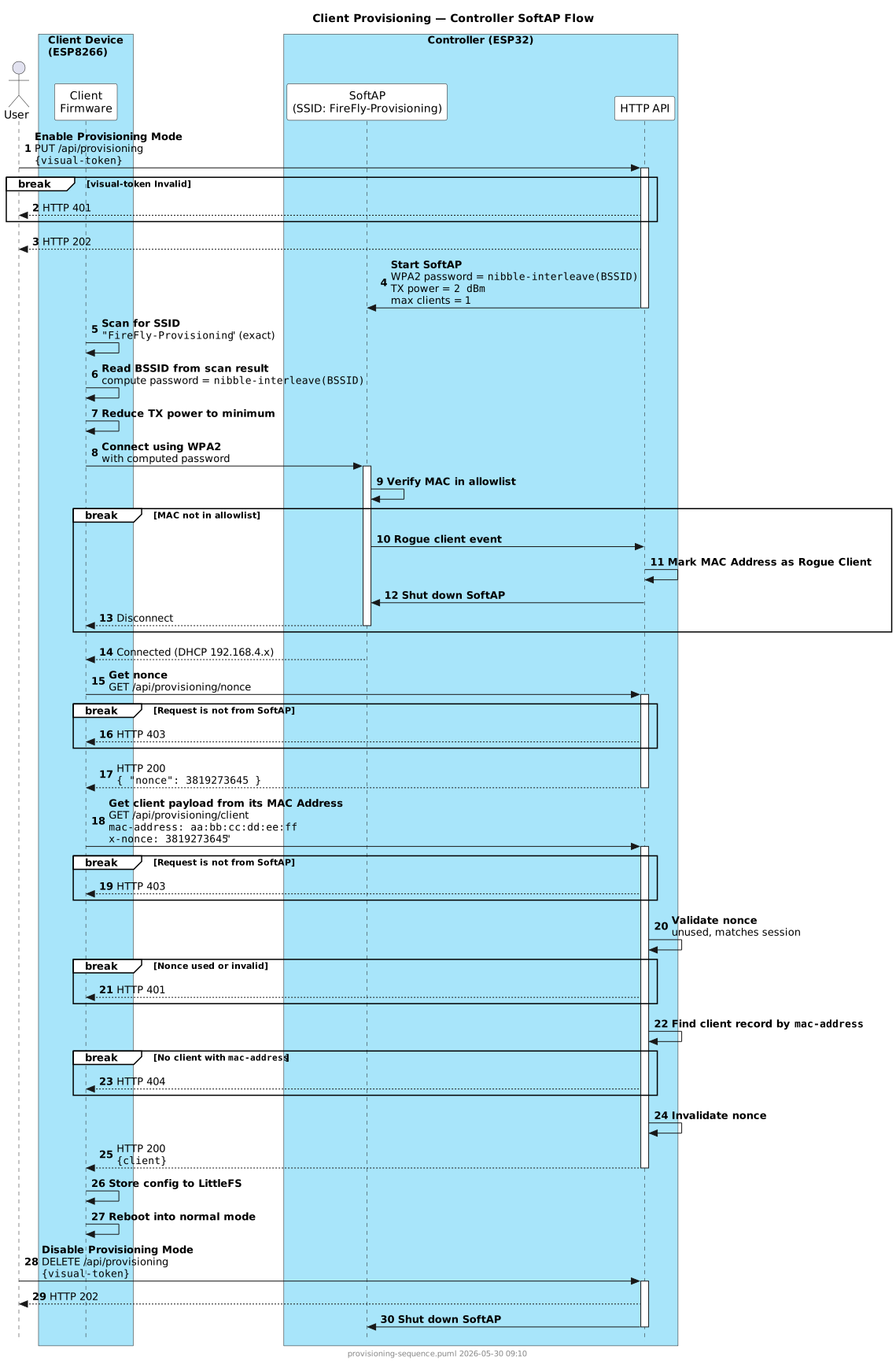
Step 1 — Enable Provisioning Mode
The browser calls PUT /api/provisioning. The Controller reads all registered client records, loads their MAC addresses into the allowlist, and starts the SoftAP with a device-unique WPA2 password. TX power is reduced to approximately 2 dBm to limit the SoftAP range to 3–5 feet, preventing over-the-air eavesdropping from a distance.
Step 2 — Client Scans and Connects
The Client firmware scans for the exact SSID FireFly-Provisioning, reads the BSSID from the scan result, and derives the WPA2 password using the nibble-interleave algorithm (see SoftAP Password below). The Client also reduces its own TX power to minimum before associating.
If the connecting device's MAC address is not in the allowlist, Provisioning Mode is shut down automatically and a warning is shown on the OLED display.
Step 3 — Token Exchange
The Client POSTs its UUID and MAC address to POST /api/provisioning/token. The Controller validates that a client record exists for the UUID. On success, it returns a short-lived per-device bearer token bound to the submitted MAC address.
The token has a sliding expiry window (5 minutes in production, 30 minutes in debug builds). Only one token is active per MAC address at a time; a new POST invalidates any previous token for that MAC.
If the UUID is unknown, the Controller returns HTTP 404 and the Client retries on the next scan cycle.
Step 4 — Configuration Retrieval
The Client calls GET /api/clients/{uuid} with the provisioning token in the provisioning-token header. The Controller validates the token and returns the full client configuration JSON.
The provisioning-token header is only accepted via the SoftAP interface; it is rejected with HTTP 403 on the Ethernet interface.
Step 5 — Client Stores Config and Reboots
The Client stores the received configuration to persistent storage and reboots into normal operating mode (connect to WiFi → connect to MQTT → normal operation).
Controller Provisioning
Controller Provisioning allows an unconfigured Controller to automatically receive its full configuration — including all controller and client records — from a source Controller at boot time, with no user interaction on the target device.
Prerequisites
- The target Controller's MAC address must already be registered in the source Controller's configuration. This is done during manufacturing via the Hardware Registration and Configuration application.
- The source Controller must have Provisioning Mode active before the target boots.
Protocol
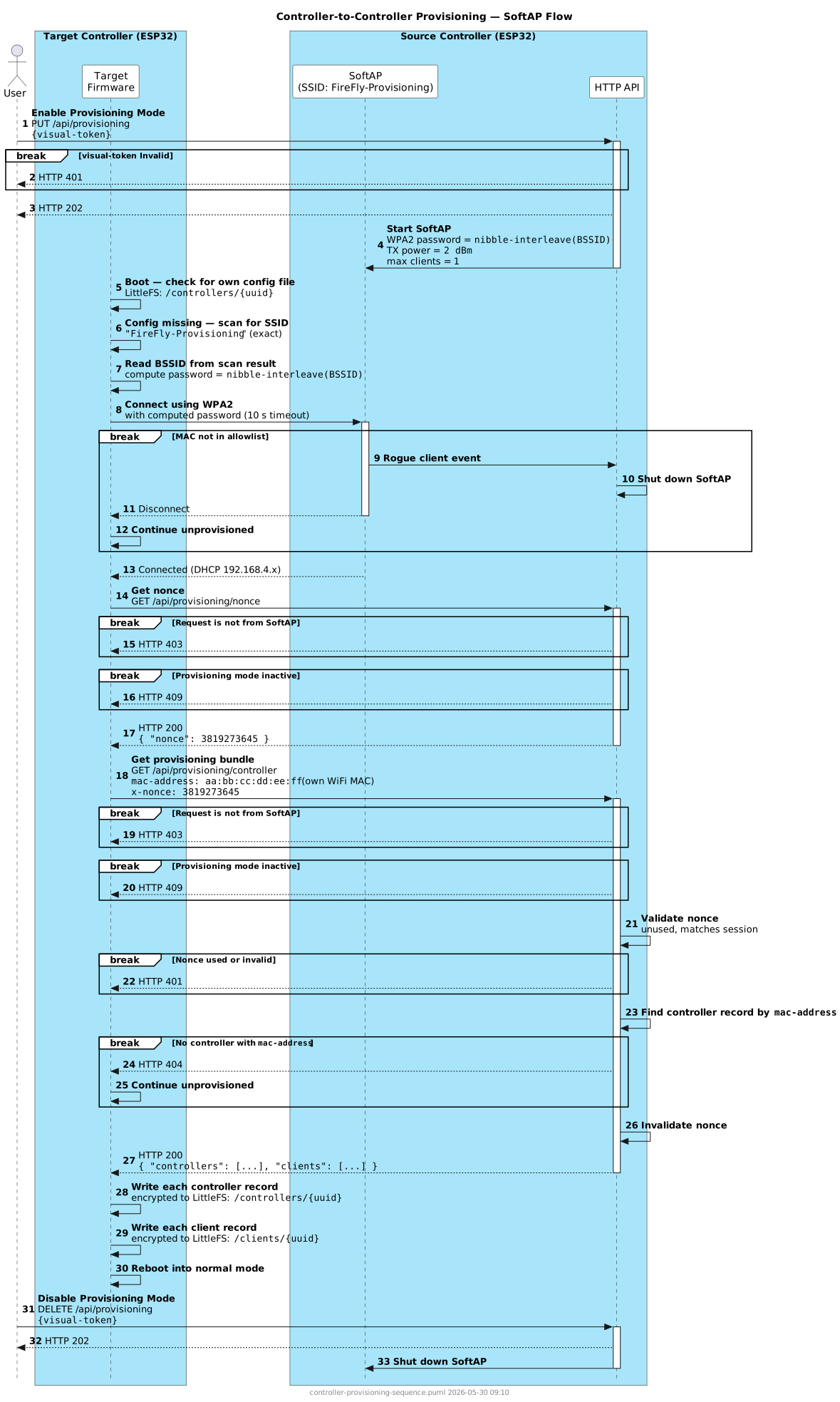
Step 1 — Enable Provisioning Mode on Source
Enable Provisioning Mode on the source Controller via the Configurator UI or by calling PUT /api/provisioning. The source starts its SoftAP with SSID FireFly-Provisioning and a device-unique WPA2 password derived from its BSSID.
Step 2 — Target Boots and Scans
On boot, the target Controller checks whether its own configuration file exists in its file system. If it does not, the target scans for the exact SSID FireFly-Provisioning.
If no matching AP is found, the target continues booting without configuration and will retry on the next reboot.
Step 3 — Target Derives Password and Connects
The target reads the BSSID from the scan result and computes the WPA2 password using the same nibble-interleave algorithm (see SoftAP Password below).
WARNING
Before associating, the target overrides its WiFi station MAC address with its own Ethernet MAC address. The source Controller's allowlist and all configuration records identify controllers by Ethernet MAC, so this ensures the target presents a consistent identity at every stage of the provisioning flow — WiFi association, the MAC allowlist check, and the token exchange request. The MAC override is temporary and resets to the factory WiFi MAC on reboot.
The target then attempts to connect, with a 10-second timeout.
If the target's Ethernet MAC address is not in the source's allowlist, the source shuts down the SoftAP and logs a warning. The target continues unprovisioned.
Step 4 — Token Exchange
The target POSTs its UUID and Ethernet MAC address to POST /api/provisioning/token. The source validates that a controller record file exists for the UUID. On success, the source returns a short-lived per-device bearer token bound to the submitted MAC address.
The token has a sliding expiry window (5 minutes in production, 30 minutes in debug builds), reset on each authenticated request. Only one token is active per MAC address at a time; a new POST invalidates any previous token for that MAC.
If the UUID is unknown, the source returns HTTP 404 and the target continues unprovisioned.
Step 5 — Cleanup
After receiving a valid token, the target deletes all existing records and any stored backup. This ensures the device always ends up in a clean state matching the source. Cleanup only occurs after a successful token exchange — a failed connection attempt will not wipe existing configuration.
Step 6 — Individual Record Retrieval
Using the provisioning token in the provisioning-token header, the target calls the regular GET endpoints one record at a time:
GET /api/controllers— retrieve the list of controller UUIDsGET /api/controllers/{uuid}— retrieve and encrypt-store each controller recordGET /api/clients— retrieve the list of client UUIDsGET /api/clients/{uuid}— retrieve and encrypt-store each client recordGET /backup— retrieve the backup if one exists (404 is non-fatal); this endpoint is shared across all device types
Each response is encrypted and written to the target's file system immediately, so only one record is held in RAM at a time.
All requests are enforced to arrive via the SoftAP interface — the provisioning-token header is refused on the Ethernet interface to prevent captured-token replay attacks.
Step 7 — Count Verification and Result Display
After all requests complete, the target compares the number of files written against the number of UUIDs returned in the list responses. The result is shown on the OLED display and written to the event log:
| Outcome | OLED line 1 | OLED line 2 |
|---|---|---|
| All counts match, backup received | Prov OK {X}C {Y}L | Prov OK got backup |
| All counts match, no backup on source | Prov OK {X}C {Y}L | Prov OK no backup |
| Controller count mismatch | Prov fail C {A}/{B} | — |
| Client count mismatch | Prov fail L {A}/{B} | — |
| Backup parse or write failed | Prov OK {X}C {Y}L | Prov bad backup |
Step 8 — Reboot on Success
If all controller and client counts match, and the backup result is either received successfully or not present on the source (404), the target displays the result for 5 seconds and then reboots into normal operating mode.
If any count mismatches or the backup parse fails, the target does not reboot. The OLED remains on the event log page so the operator can see the failure before taking action.
SoftAP Password
The WPA2 password is derived deterministically from the Controller's SoftAP BSSID MAC address using a nibble-interleave algorithm. This means each Controller device has a unique SoftAP password that neither requires pre-provisioning nor a label on the hardware.
Algorithm: For each index i from 0 to 5, take the upper nibble of BSSID[i] and the lower nibble of BSSID[5-i], and concatenate as uppercase hex.
| BSSID | Password |
|---|---|
A1:B2:C3:D4:E5:F6 | A6B5C4D3E2F1 |
The password is 12 uppercase hex characters (satisfies the WPA2 8-character minimum). The same algorithm is implemented identically on both Client and Controller firmware. The current SoftAP SSID and password are returned in the GET /api/provisioning response when provisioning mode is active, so the browser UI can display them if needed.
Security
- WPA2 (CCMP/AES) encrypts all traffic between the Controller SoftAP and any connecting device, protecting credentials and configuration payloads in transit
- Per-device provisioning token — an OAuth-style bearer token (UUID + MAC → token) scoped to a single device with a sliding expiry window; replaces single-use nonces with a session token that survives multiple requests
- SoftAP-only enforcement — the
provisioning-tokenheader is rejected with HTTP 403 on the Ethernet interface, preventing a captured token from being replayed from a different network - MAC allowlist prevents unregistered devices from obtaining any configuration
- 2 dBm TX power on both the SoftAP and connecting device limits effective range to 3–5 feet
- Single-client SoftAP prevents two devices from provisioning simultaneously
- Provisioning mode required — endpoints return HTTP 409 if provisioning mode is not active, ensuring the source is never passively serving configuration
- Post-token-only cleanup — the target wipes its existing config only after a valid token is received, protecting against accidental data loss from failed connection attempts
WARNING
The SoftAP password is derived from the BSSID, which is visible to any device performing a WiFi scan. The algorithm is documented and embedded in the firmware. Physical proximity is the primary barrier against unauthorized access during provisioning. Provisioning sessions should be conducted in a controlled environment.
MAC address spoofing remains a theoretical risk: a spoofed MAC will pass the allowlist check at WiFi association time. However, the attacker would also need to know the correct UUID (stored in the target's device identity) and the target's Ethernet MAC to obtain a provisioning token.
See API Reference for the full endpoint documentation.