Hardware Registration and Configuration
The Hardware Registration and Configuration application is intended to be used to perform the initial configuration of the device. This application is used at the factory to configure the device prior to being shipped, or by a developer building their own hardware.
✅ What this application does
- Sets up an HTTP server using on-board WiFi SoftAP at minimum TX power to limit radio range to the manufacturing area
- Exposes a REST API to write device identity (UUID,
product_id,product_hex) to EEPROM — the master cryptographic key is generated on-device and never transmitted - Optionally registers the device with FireFly-Cloud using a time-limited registration key
Device Identity EEPROM Storage
Unlike the Controller, which uses hardware one-time-programmable eFuse registers, the ESP8266 has no eFuse equivalent. Device identity is stored in EEPROM using software-enforced one-write semantics.
| Field | Size | EEPROM Offset |
|---|---|---|
| UUID | 16 bytes | 2 |
product_hex | 4 bytes | 18 |
| Master key | 32 bytes | 22 |
product_id | 33 bytes | 54 |
See ESP8266 Special Handling — Device Identity for the complete EEPROM layout, magic bytes, one-write semantics, and security characteristics.
Software-enforced only
On the Controller, eFuse burns are permanent and hardware-protected. On the Client, EEPROM identity is enforced only in software — the wipe() method is available to the HW-Reg application to reset a device for re-registration.
Workflow
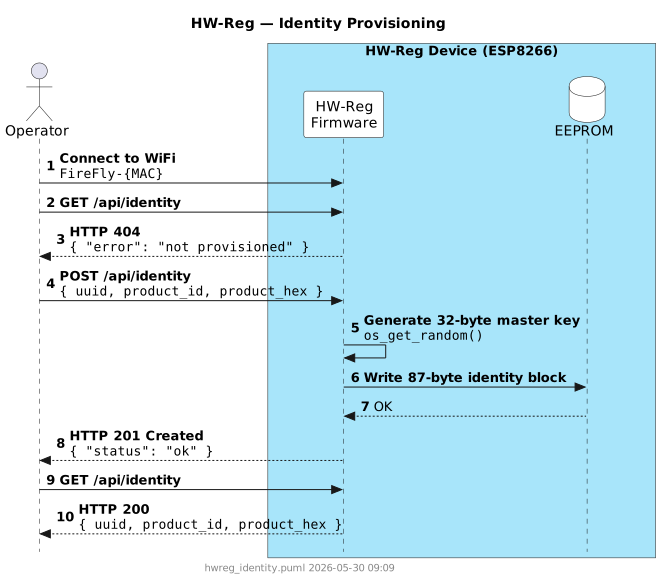
The HW-Reg application runs in SoftAP mode — the device creates its own WiFi network named FireFly-{MAC} (e.g. FireFly-AABBCCDDEEFF). Because the device has no internet uplink in this mode, identity provisioning and cloud registration are independent steps. A temporarily unavailable cloud does not block EEPROM provisioning.
Step 1 — Identity Provisioning (required)
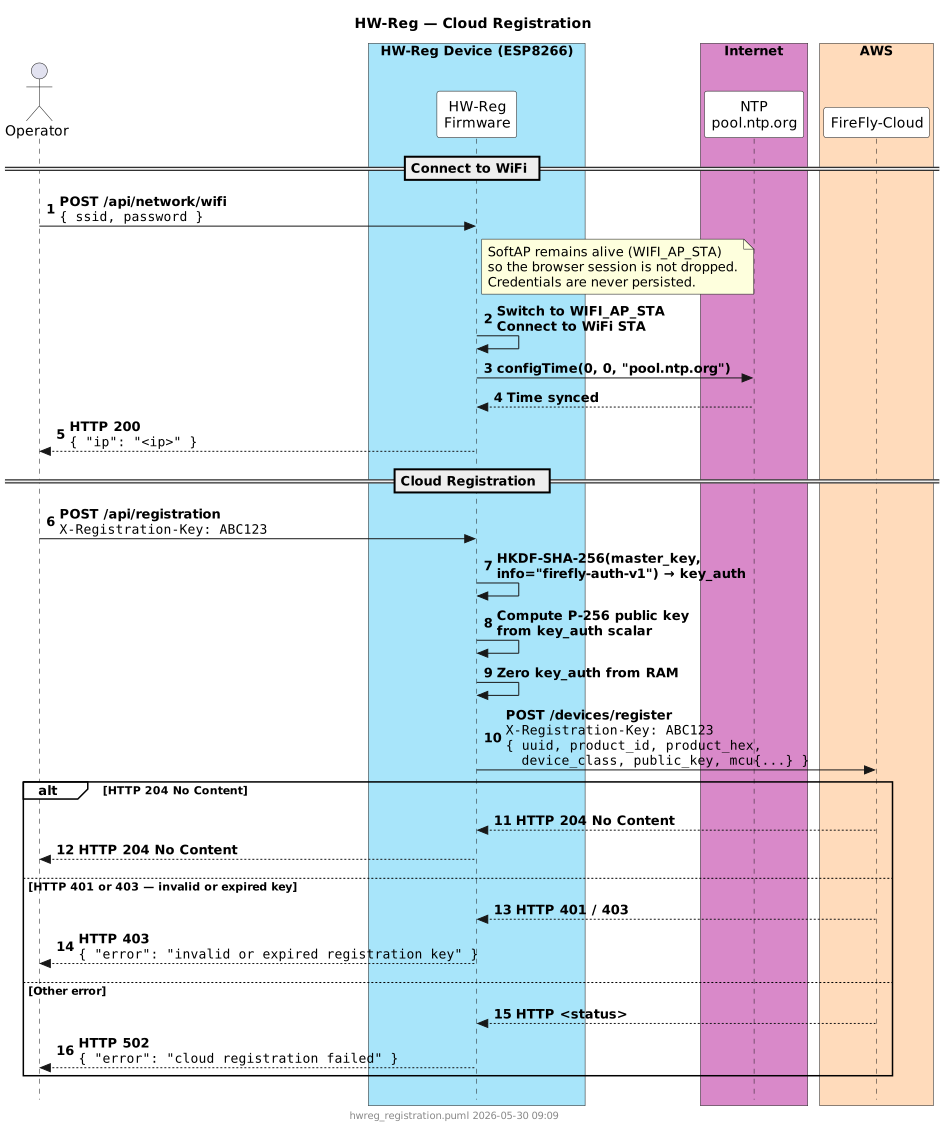
Step 2 — Cloud Registration (optional)
Cloud registration requires the operator to provide WiFi credentials so the device can reach FireFly-Cloud and sync NTP. The SoftAP remains alive during this step so the browser session is not interrupted. WiFi credentials provided here are never persisted to storage.
A 6-character registration key must be obtained from a FireFly-Cloud administrator before performing this step. See the Controller HW-Reg Cloud Registration page for how registration keys are issued.
Step 3 — Flash production firmware
After identity provisioning (and optionally cloud registration), flash the device with the production Client Application firmware. On every subsequent boot, begin() reads and validates the identity block from EEPROM.
Key Design Notes
- One-write semantics — Once magic bytes are written to EEPROM,
POST /api/identityreturns409 Conflict. Identity cannot be overwritten via the API. - Master key never leaves the device — The 32-byte master key is generated on-chip using the hardware RNG and written directly to EEPROM. It is never included in any API response or registration payload.
- Minimum TX power — WiFi output power is set to 0 dBm at startup to limit radio range to the immediate manufacturing area.
- No web UI — HW-Reg exposes a REST API only. See the API Reference for the full endpoint documentation.
🚫 What this application does not do
- Configure WiFi credentials, MQTT settings, or OTA URL — see Provisioning Mode.
- Verify peripherals or functional hardware behavior.