Cloud Registration
During manufacturing, after device identity is burned to eFuse, the device is registered with FireFly-Cloud. Registration uploads the device UUID, product information, MCU details, and an ECDSA P-256 public key derived from the eFuse master key. The private key never leaves the device — it is re-derived on demand and zeroed immediately after use.
A Registration Key is required to complete registration. This is a 6-character one-time code generated by a FireFly-Cloud administrator and shared with the manufacturing operator. The key expires after 30 minutes and is consumed on first use.
At every boot, HW-Reg automatically verifies registration status with FireFly-Cloud once the device clock is synchronized via NTP.
Protocol
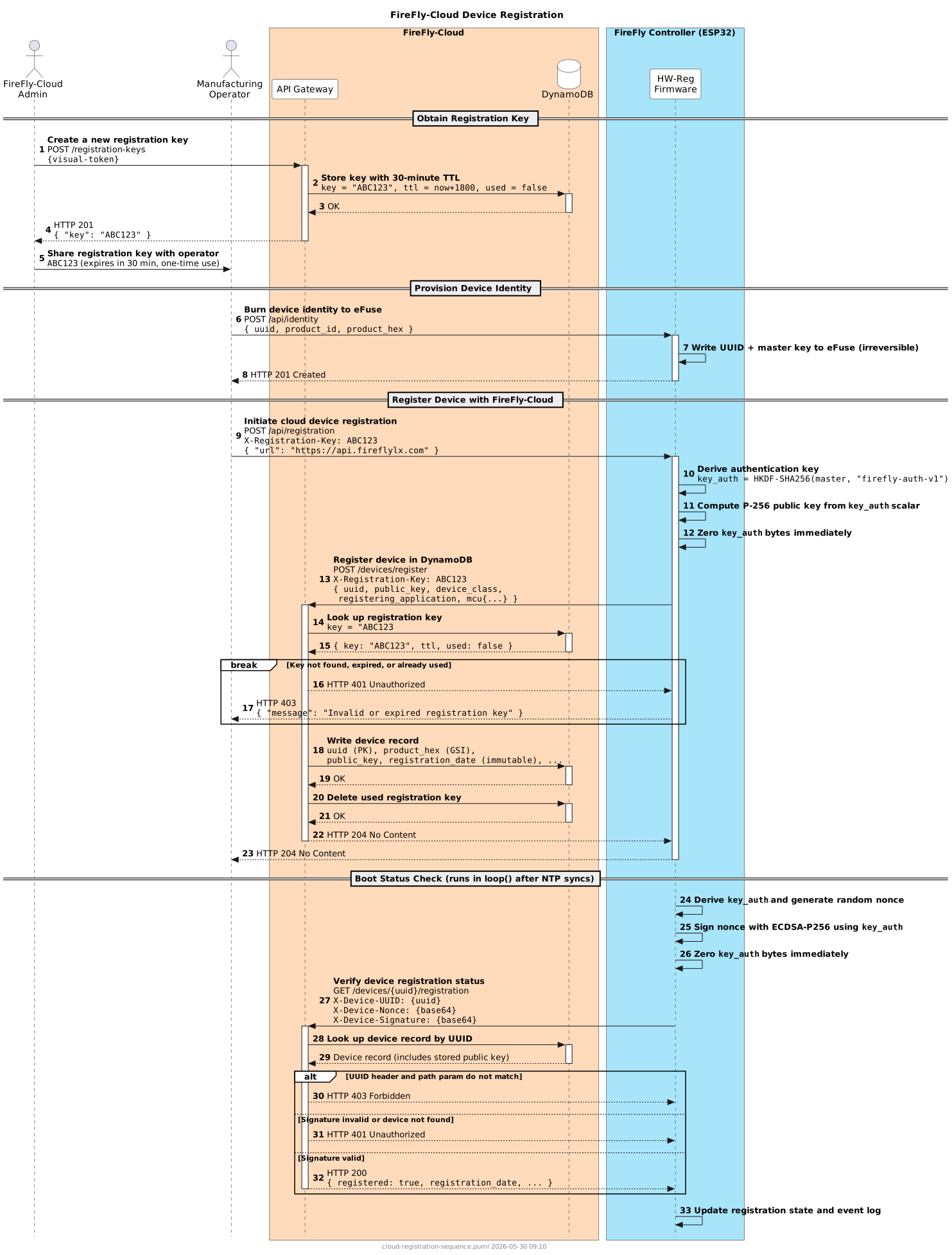
Step 1 — Obtain Registration Key
A FireFly-Cloud administrator calls POST /registration-keys. FireFly-Cloud generates a 6-character alphanumeric code, stores it with a 30-minute TTL, and returns it in the response. The administrator shares the code with the operator.
Step 2 — Provision Device Identity
The operator uses the HW-Reg UI to provision the device identity. This writes the device UUID, product ID, and a randomly generated master key to eFuse (irreversible). See Identity for details.
Step 3 — Register Device
The operator enters the Registration Key and FireFly-Cloud URL in the HW-Reg UI and clicks Register Device. HW-Reg:
- Derives
key_auth = HKDF-SHA256(master_key, "firefly-auth-v1")from the eFuse master key - Computes the ECDSA P-256 public key from
key_authas a scalar - Zeros
key_authbytes immediately - POSTs the device record (UUID, public key, MCU details) to
POST /devices/registerwith the Registration Key in theX-Registration-Keyheader
FireFly-Cloud validates the key, writes the device record to DynamoDB (with registration_date set immutably), and deletes the consumed key.
Step 4 — Boot Status Check
After every boot, once NTP synchronizes the clock, HW-Reg checks registration status automatically:
- Derives
key_authfrom the eFuse master key - Generates a random 32-byte nonce and signs it with ECDSA P-256
- Zeros
key_authimmediately - Calls
GET /devices/{uuid}/registrationwith the signed nonce in headers - FireFly-Cloud verifies the signature against the stored public key and returns the registration status
The result is held in RAM for the current session. The nav item shows a warning indicator if the device is provisioned but not registered.
Security
Security model
- ECDSA P-256 private key is derived deterministically from the eFuse master key and never stored — it exists only in RAM for the duration of a signing operation, then is immediately zeroed
- Registration Key is a short-lived, one-time-use code; consuming it prevents replay attacks from intercepted registration requests
- Signed nonce authentication proves device identity for the boot status check without transmitting any long-lived secret
- Public key only in cloud — FireFly-Cloud stores only the public key; a compromised cloud database cannot derive the device's private key or master secret
- Delete-protected DynamoDB table — device records cannot be accidentally deleted;
registration_dateis set once and immutable
Event Log Entries
| Message | Level | Meaning |
|---|---|---|
Cloud reg check | INFO | HW-Reg attempted to verify cloud registration status at boot |
Cloud registered | INFO | Device confirmed as registered with FireFly-Cloud |
Cloud reg fail | NOTIFICATION | Cloud registration or verification request failed (network error, crypto failure, or unexpected HTTP status) |
See Abbreviations for the full event log abbreviation reference.